
Find the bookmark
you meant to revisit.
Search the links already saved in Chrome, or follow the visual timeline back to the day you found them. No account or import needed.
Add to ChromeChrome Web StoreYour Chrome bookmarks stay the source of truth. Search runs on this device.
Remember the research. Recover the link.
Start with a title, part of a URL, or the month you remember. Rewind helps you return to the page you saved, without reorganizing your library first.
- Search saved titles and URLs locally.
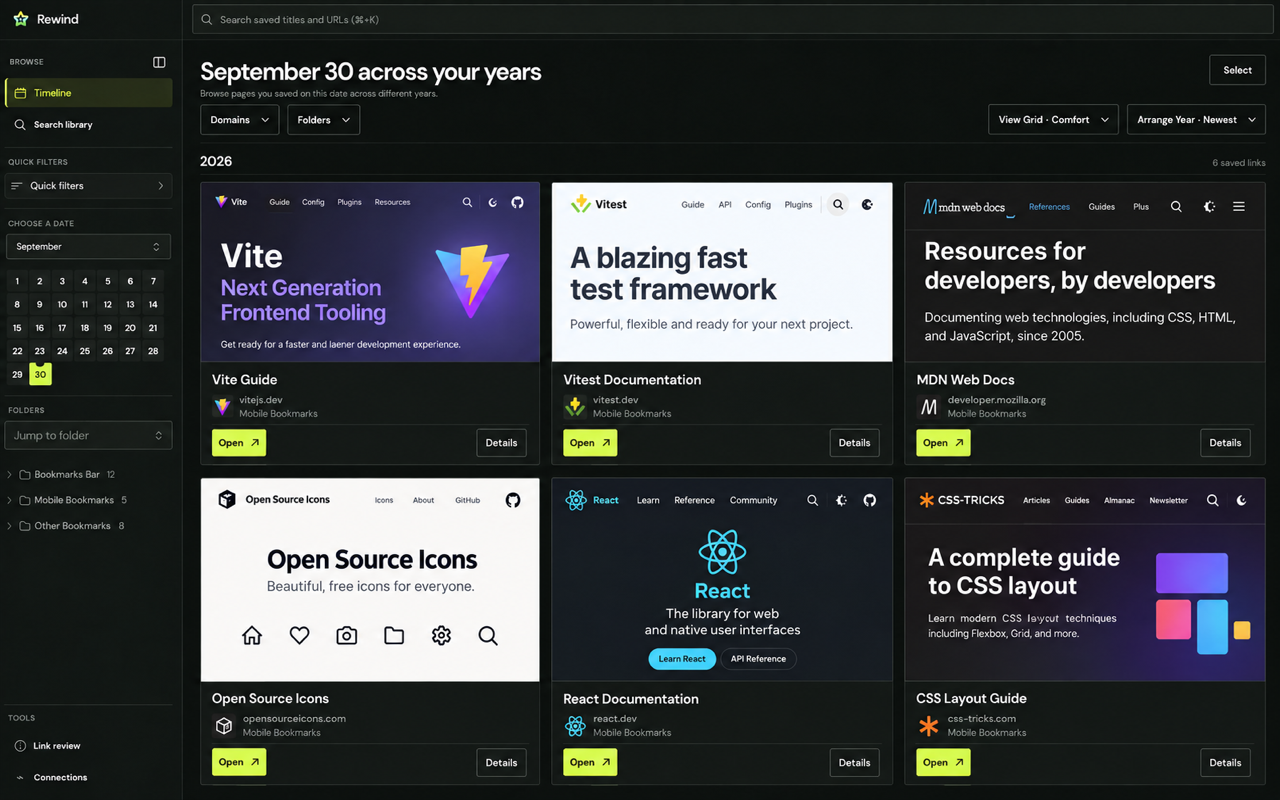
- Browse by month and day across years.
- Narrow results by domain and folder.
July
040506081219
Your interests are already in Chrome.
Install Rewind and the links you have collected for years become the starting point. There is no empty account to train and no second inbox to fill.
- Chrome remains the source of truth.
- Search and filtering run locally.
- Preview metadata requests occur only for displayed cards.
- Your existing Chrome folders remain available.
The bookmark search engine for people who save everything.
Search when you remember a word. Browse the timeline when you remember the project or the time of year. Both use the collection already in Chrome.
- Search titles, URLs, domains, and folders without waiting for a cloud index.
- Use dates and thumbnails when you remember a moment more clearly than a keyword.
- Keep Chrome folders intact instead of reorganizing everything first.
- Open the original saved page directly from a result.
What to know before installing.
Does Rewind replace Chrome bookmarks?
No. Chrome remains the source of truth. Rewind gives those same bookmarks a better browsing and retrieval interface.
Does search upload my library?
No. Search runs in your browser. Displaying a preview card may send that individual URL to Rewind’s preview service and load its image from a third-party host.
Is there an account?
No account is required to browse your saved links. Rewind is designed around the browser data you already have.
Does Rewind recommend new websites?
The public promise is finding your own saved bookmarks. Outside-link recommendations are not part of the public extension interface.
Before you reorganize, measure.
Free, privacy-first tools and source-backed guides for understanding a bookmark library, moving it between browsers, and keeping the original file intact.
01 · Local toolBookmark File Analyzer
Find duplicate destinations, tracking variants, large folders, top domains, and save dates without uploading your file.
↗02 · Field guideMove bookmarks between browsersA careful export, inspect, import, and verification checklist for Chrome, Edge, Firefox, and Safari.
↗03 · Research + datasetBrowser Bookmark Portability Report 2026What the four major desktop browsers preserve, package differently, or leave outside the bookmark HTML layer.
↗Pick up where your research left off.
Install Rewind and search the bookmarks already in Chrome, with a visual timeline for the links you remember saving.